
Loftia House Showcase exists in the demo, and patch notes 1 fixed the login bug on its results screen. What is confirmed, and how players share homes.
Loftia House Showcase: What the Demo Confirms About Sharing Your Home
Loftia House Showcase is a real feature already in the Next Fest demo, and the developers have confirmed it in writing exactly once: patch notes #1, published on October 21, 2026, opens with the bugfix "Fixed being sent back to the login screen when checking House Showcase results." That line is the entire official record. There is no House Showcase page on loftia.gg and no photo mode in any official document, so sharing a home in Loftia is two things, a neighbourhood activity inside the demo and a screenshot habit the community runs outside it. If you came here for a camera button, there is none.
| What players ask | Status on October 22, 2026 | Source |
|---|---|---|
| Does House Showcase exist? | Yes, in the demo | Patch notes #1 |
| How do showcases work (theme, submit, vote)? | Community-documented, Closed Beta | Community wikis |
| Is there a photo mode? | None documented officially | Official site, Steam, EA list |
| Can I post screenshots of my own home? | Yes, explicitly allowed | Beta FAQ, archived |
| Where do showcases live? | On your floating island, in a neighbourhood | Official site |
The One Line That Proves House Showcase Exists
The demo patch notes dated October 21, 2026 list their bugfixes first, and the entry reads: "Fixed being sent back to the login screen when checking House Showcase results."
Official source: Patch notes #1
Two things fall out of that. House Showcase is not a roadmap item: a fix only makes sense for a feature players could already reach in the demo build. And "results" points to a screen that displays what a showcase produced. That is all Qloud Games has published.
Everything else is community-documented. Fan wikis built from the April 2026 Closed Beta describe House Showcases as a home decoration contest: decorate a house to a theme, submit it, and the neighbourhood votes. A fan quest database records a side quest called Cozy Corners, given by Estella, whose official role is Furniture and Decoration Expert, that asks you to decorate for a house contest and pays a reward. Both readings agree with the patch note, but no official page confirms them: treat them as community-reported.
No showcase page and no photo mode page exist on loftia.gg. A guide that sends you to a Showcase menu on the official site describes a screen that is not there.
Where Showcases Live: A Neighbourhood, Not a Gallery
Loftia has no showroom district. Homes sit on floating islands, and players link islands up into neighbourhoods themselves. The official feature list on the Loftia site puts it plainly: "Create your own floating island and link up with others to form neighborhoods. Decorate, farm, craft, and spend time together in shared spaces that feel lived-in and personal."
Official source: Official site
You do not wait long to reach one in the demo. The demo announcement says the Demo Banner reward unlocks the first time you enter the Player Neighborhood, reachable within the first ten minutes, and calls the demo the stretch where you "decorate your home in a shared neighborhood". The demo page lists Decorating, Sharing and Social among the things you can try.
Official source: Demo launch announcement
Two official known issues from the same week shape how a shared home feels. Travelling to a player island as a group can crash, because group housing servers are not always allocated correctly, and the demo banner uses a temporary placeholder asset and icon, so the marker on your own island looks unfinished.
Official source: Known Issues (updated Oct 21, 2026)
The demo also stops at a single district: the questline ends right before Hanging Gardens, so every neighbourhood you can walk into sits in Loftia City.
Sharing Your Home: What the Demo Actually Lets You Do
| Action | In the demo? | Notes |
|---|---|---|
| Decorate your island and house | Yes | Official demo page |
| Walk into a shared neighbourhood | Yes | Reachable in ten minutes |
| Travel to another player's island | Yes, with a caveat | Group travel can crash |
| Open House Showcase and view results | Yes | Patch notes #1 fix |
| Use an in-game camera or photo mode | No | Not on the official site, Steam or EA list |
| Post screenshots of your home outside the game | Yes, encouraged | The Beta FAQ allows it |
Shoot in-game if the view is clean, then post it yourself. The Beta FAQ states there are no restrictions on where you talk about Loftia or share screenshots and footage, in public Discord channels, on social media, with friends, or anywhere else.
Official source: Beta FAQ, archived
What you can put on display got a real upgrade before the demo opened. On October 1, 2026 the official Loftia account announced a major housing customization update: house interiors can now be completely redesigned using structural decoration, after the housing system was held back during the beta playtests. That post drew thousands of likes and hundreds of replies, the clearest signal yet of how much players care about showing a room.
Official source: Housing update post
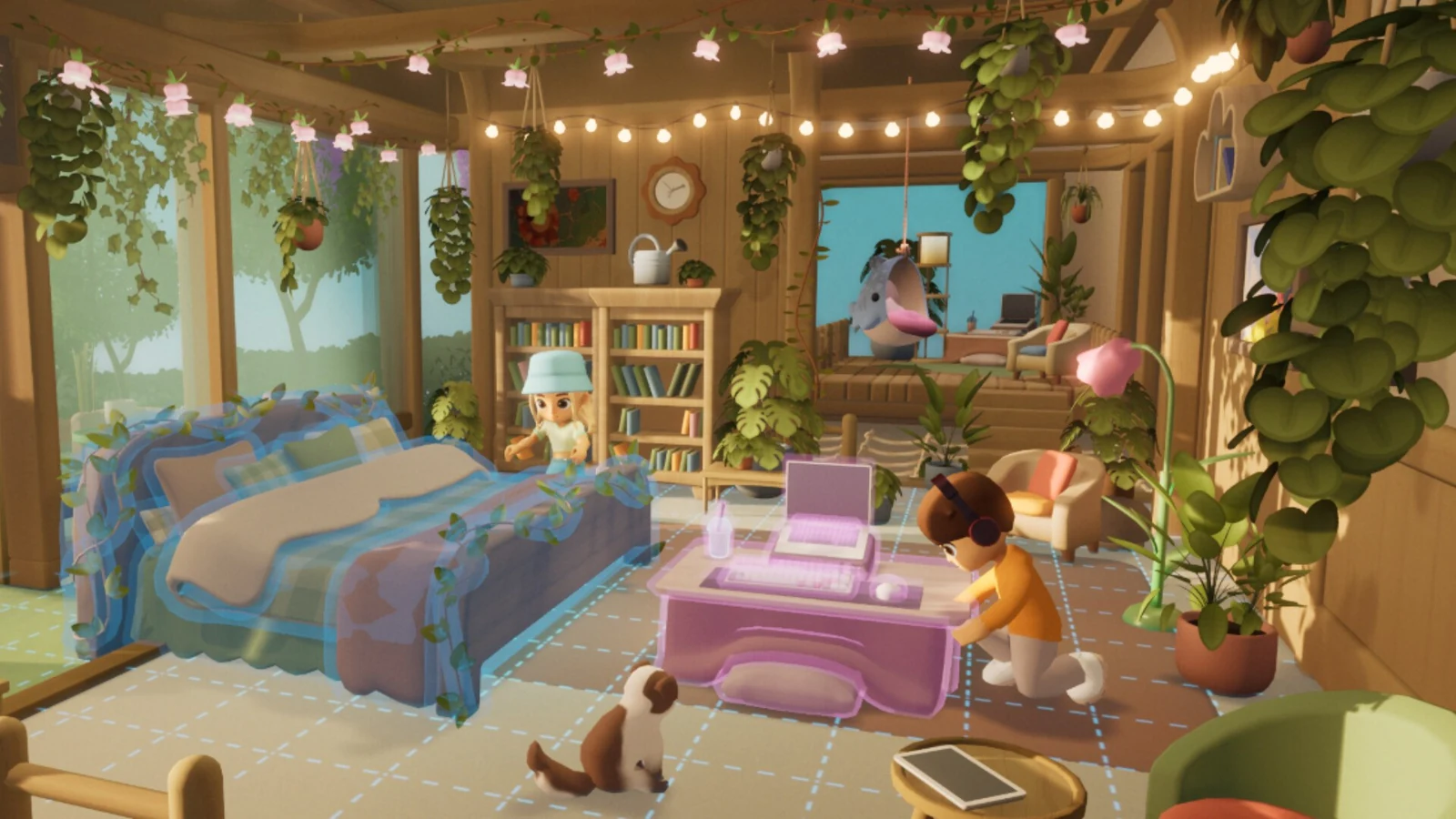
House interiors are what players screenshot most.
The Sharing Problems That Actually Exist
| Symptom | Official status | What to do |
|---|---|---|
| House Showcase results send you back to the login screen | Fixed in patch notes #1 | Update the demo, restart from login |
| The group crashes while travelling to a player island | Known issue, under investigation | Travel alone, or re-form the group on arrival |
| The demo banner on your island looks unfinished | Known issue, placeholder asset and icon | Cosmetic |
| Rain never renders in your neighbourhood | Known issue, rain effects missing | Cosmetic |
| Background NPCs stand in midair inside your home | Known issue, NPCs wander into odd spots | Cosmetic |
Anything not on that list belongs in the official bug report form on the demo page.
Only players on the same server can play together, though you are not locked to a server and can find your friends whenever you want. Cross-platform play is still only something the developers are aiming for, so buy the game separately on each platform. The neighbourhood you visit at Early Access on November 3, 2026 may be smaller than your friend list suggests.
Official source: FAQ
What Changes at Early Access on November 3, 2026
Your house and everything in it comes with you. The demo announcement is unambiguous: progress made in the demo carries over into Early Access, and all completed quests, collected items and character progression remain with you. Your character name carries over too, with one deadline: if you claim a name in the demo and do not log in between November 3, 2026 and February 3, 2027, it goes back into the pool for other players.
House Showcase is not on the Early Access feature list. The official page names eight additions: Hanging Gardens, Gridfall, Pets, proficiency levels beyond the demo cap with Perks, Hydroponics Stations and Super Crops, more adventure gauntlets, more World Projects, and Urbex. None is a showcase feature, so nothing announced so far changes how showcases work.
Official source: Early Access page
Two of those additions reshape the neighbourhood around your door. More World Projects means larger community builds, including rebuilding the Loftia City Dome and adding renewable energy sources, and Hanging Gardens arrives as a second district of floating islands with community farms and fishing spots. Both come in Early Access on November 3, 2026, and both change who stands next to you.
To see a finished house before building one, the decorating and furniture guide covers the pieces you display, the Loftia City guide maps the demo district, and the multiplayer and servers guide explains the server rules that decide who shows up.
FAQ
Where is House Showcase in Loftia? It is in the demo build, and the only official evidence is the patch notes #1 fix for being sent back to the login screen when checking House Showcase results. No page explains where the menu sits, so expect to find it around the neighbourhood area of your island.
Does Loftia have a photo mode? No photo mode is documented anywhere: not on the official site, not on the Steam store page, not on the Early Access feature list. Screenshots still work normally, and the developers explicitly allow sharing them.
How do I share my house with friends in the demo? Decorate your island, then meet up in the shared Player Neighborhood, reachable within the first ten minutes of the demo. Travelling to another player's island as a group can crash, so travel solo or re-form the group on arrival.
Do I need other players for House Showcase to work? Solo play is fine overall, because playing alone does not block your progress. Voting on showcases is a group activity by nature, and the demo rewards are social too: the Pebble Chair needs one friend in the demo, the Pebble Couch two.
Will my decorated house carry over to Early Access? Yes. Progress, collected items and character progression all carry over. Only the name has a deadline: claim one in the demo, stay away between November 3, 2026 and February 3, 2027, and it will be released for other players.
Can I visit my friend's house if we are on different servers? No. Only players on the same server can play together, though you are not locked to a server and can move to find your friends whenever you want.
Related Guides
- Loftia Decorating and Furniture Guide - the furniture and structural pieces you display.
- Loftia Multiplayer and Servers Explained - server rules and why visiting a neighbour can fail.
- Loftia World Projects: How Community Builds Work - shared builds that change your neighbourhood at Early Access.
- Loftia City Guide: The Demo District - the one district open in the demo.
- Loftia Demo Progress and What Carries Over - what happens to your house and name on November 3, 2026.
More Loftia Guides
How Loftia crafting works: renewable-powered tools, refining stations, material tiers and the tool wheel, as confirmed in the October 2026 demo.
The confirmed Loftia crop situation: 10 basic and 5 exotic crops announced for hydroponic farming, plus Bioluminescent Ivy, rest pending.
How Loftia decorating works: Estella the furniture expert, shared neighbourhood islands, and a cosmetics-only Backer Boutique with no gacha.
Loftia demo progress, character name and three demo rewards carry into Early Access on November 3, 2026, but only if you link your loftia.gg account.
How Loftia farming works: hydroponics, aquaponics and trellis growing, the four hydroponic factors, and what the demo lets you plant.
Loftia fishing: a listed proficiency capped at Level 5 in the demo, the fishing spots in Hanging Gardens, Kassim the fishing expert, and a community fish list.
Gridfall is Loftia's salvaging district: a concrete jungle on old world ruins, with air rails, skyscrapers, a museum and underground tunnels.
Hanging Gardens arrives in Early Access on November 3, 2026: a quiet floating island with greenery, fishing spots, farms and a forest.